
Download TuneXP – Windows XP optimization, system performance, memory management, file system defrag, DLL unloading, free utility, advanced user tools, system tweaks, Windows XP tool
Overview
TuneXP is a free utility developed specifically for Windows XP systems, designed to enhance performance through a suite of system-level optimizations. Its primary purpose is to allow advanced users to fine-tune their Windows XP environment by adjusting memory handling, file system behavior, and system service configurations. The app targets users who are comfortable navigating system-level settings and are looking to improve responsiveness, boot speed, and overall system efficiency. While the interface is not visually polished, its menu-driven structure supports straightforward access to powerful tools, making it accessible to technically inclined users without requiring deep coding knowledge. The utility addresses common performance bottlenecks in older systems, such as slow DLL unloading and fragmented boot files, which can degrade user experience over time. Real-world use cases include extending the usability of legacy hardware, optimizing systems in educational or enterprise environments still reliant on Windows XP, and preparing machines for sensitive tasks where stability and speed are critical. Despite being released in 2010, TuneXP remains relevant within niche communities that maintain older systems. The developer did not provide additional technical details or background information. The app’s continued availability suggests ongoing interest from users seeking lightweight, no-cost performance enhancements for outdated but functional Windows XP setups.Key Features & Functionality
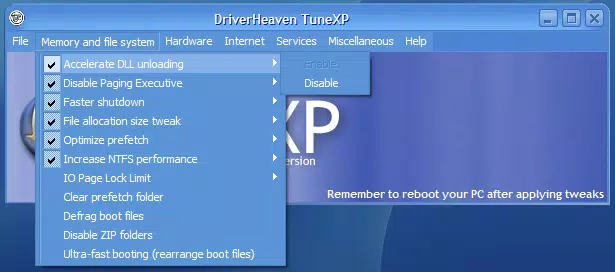
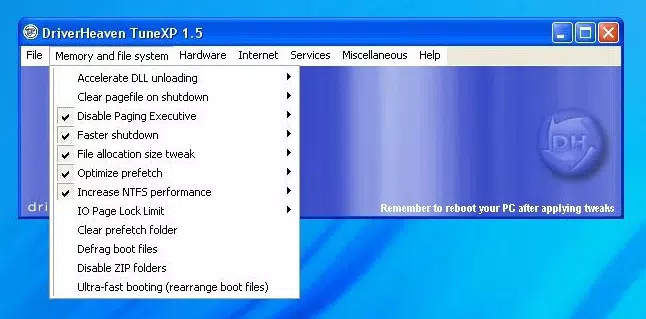
TuneXP delivers a range of system-level tools aimed at improving Windows XP performance through targeted adjustments. One core feature is memory and file system optimization, which includes accelerating DLL unloading—a process that can reduce memory leakage and improve application responsiveness. Another key functionality is the defragmentation of boot files, which helps shorten startup times by organizing critical system files for faster access. The utility organizes its tools into logical categories such as Internet, Hardware, and Services, enabling users to quickly locate and apply relevant optimizations without navigating complex menus. Each tool is accompanied by comprehensive help files that explain its function, potential impact, and recommended usage, supporting informed decision-making for advanced users. The interface, though minimalistic, allows users to apply changes through simple menu selections, reducing the risk of misconfiguration. For example, a user managing a legacy lab computer could use TuneXP to defragment boot files and adjust memory handling to ensure faster boot sequences and smoother multitasking. Similarly, a system administrator maintaining older kiosk machines might leverage the service tweaks to disable unnecessary background processes. The tool’s free availability removes financial barriers to access, making it a cost-effective solution for performance tuning. While not suitable for novice users due to its technical nature, TuneXP provides a focused set of utilities that deliver measurable improvements for those with the necessary expertise.Real-World Application Examples
- Defragmenting boot files to reduce startup time on older hardware.
- Adjusting DLL unloading behavior to prevent memory buildup during extended use.
- Disabling unused services to improve system stability and performance.
- Optimizing network settings for better internet responsiveness on legacy systems.
- Using help documentation to safely apply system tweaks without unintended consequences.
Interface, UX & Performance
TuneXP features a straightforward, menu-driven interface that prioritizes functionality over visual design. The layout is organized around clearly labeled categories, allowing users to navigate between system tools with minimal friction. Although the visual style is basic and lacks modern design elements, the simplicity contributes to usability by minimizing distractions. Navigation is linear and predictable, with each tool accessible through a consistent menu structure. The app responds promptly to user input, and changes are applied without visible lag, indicating stable operation under typical usage conditions. Although the developer did not list formal performance metrics, the tool’s lightweight footprint—2.5 MB—suggests minimal resource consumption during execution. The application runs efficiently on older hardware, consistent with the target Windows XP environment. Responsiveness is maintained across different device categories, including low-spec desktops and older laptops. Stability appears reliable based on its long-standing presence in the software ecosystem. The developer did not provide information on crash reports, update frequency, or error handling. Users are advised to back up system configurations before applying changes, as some tools may affect system behavior. Overall, the UX is functional and purpose-driven, aligning with the needs of its target audience: technically proficient users seeking direct control over system performance.Platform Compatibility & Technical Requirements
TuneXP is designed for the Windows operating system and is compatible with Windows XP. The application requires no additional software dependencies and operates as a standalone executable. The file size is 2.5 MB, indicating a lightweight installation with minimal storage impact. The software version is 2.0, and the release date was April 15, 2010. The developer did not specify minimum OS requirements beyond Windows XP. Compatibility with newer Windows versions was not disclosed. Users should verify that their system meets the basic requirements for running Windows XP before attempting to install or use TuneXP. The app does not require administrative privileges for all functions, though some tools may prompt for elevated permissions to modify system settings. Specific hardware requirements were not listed. The developer did not provide information on supported processor architectures or RAM thresholds.Pros and Cons
- Completely free to download and use.
- Lightweight design with minimal system resource usage.
- Targeted optimizations for Windows XP performance.
- Well-organized tools across logical categories.
- Comprehensive help files for informed decision-making.
- Simple, menu-driven interface suitable for advanced users.
- Not suitable for average or novice users due to technical complexity.
- Interface lacks modern visual appeal or customization options.
- No official updates since 2010; may lack compatibility with newer hardware or drivers.
- Developer did not provide current support or documentation.
- Not compatible with Windows versions beyond XP.


